Settings
 Fast Delivery
 Payment Types


 Marketplace Product


Quickly Implement USB-C Panel Power Using a Prewired Snap-In Module
It seemed to happen overnight. The USB Type-C (USB-C) plug and receptacle pair, first proposed in 2014, has become the preferred power-delivery connector, with adoption surging in recent years. A major reason for this growth spurt is a European Union (EU) mandate that, by late 2024, most small-to-medium electronics within its power envelope (phones, tablets, cameras, and similar devices) sold in the EU, and, by implication, worldwide, use this connector for wired power and charging.
This mandate aims to minimize waste, advance power-pack reuse, save money, and promote interoperability. USB-C’s worldwide acceptance accelerated when Apple Inc., which had insisted on using their proprietary “Lightning” connector, dropped their objection to the EU requirement and began adopting USB-C.
Why the rapid shift to USB-C?
USB-C offers a compact form factor, fast data rates, and high power. The standard USB-C interface supports 3 amperes (A) at a fixed 5 volts, delivering 15 watts. Enhanced versions with Power Delivery (PD) include USB PD Standard Power Range (SPR) with voltages of 5, 9, 15, and 20 volts at 5 A to deliver 100 watts (maximum) and USB PD Extended Power Range (EPR), which adds 28, 36, and 48 volt steps at 5 A to scale to 240 watts.
The standard plug size is 8.4 × 2.6 millimeters (mm) with 24 pins. The body and pins are arranged to support reversible insertion (Figure 1), eliminating the need for mechanical up/down keying.
 Figure 1: The USB-C plug (left) and receptacle (right) are reversible and are smaller than predecessor USB connectors yet can handle high power levels. (Image source: Wikipedia)
As a result of the USB-C mandate and agreement, phone vendors and many other high-volume device makers quickly standardized on USB-C as their single worldwide connector. The widespread adoption, including availability of cables, connectors, and more, spurred its use in commercial and industrial settings.
Panel integration presents practical challenges
It is conceptually simple to add a USB-C power receptacle to a product such as an outlet strip, pop-up or in-wall power outlet, appliance, desktop lamp (Figure 2), uninterruptible power supply, industrial product, or power panel. Just wire the input of a suitable AC/DC power supply to the AC line and the output to the panel-mount USB-C receptacle.
 Figure 2: Many household products, such as desk lamps, now incorporate USB-C charging receptacles in their bases, in addition to AC outlets. (Image source: Walmart)
However, adapting this arrangement presents real-world challenges. The connector receptacle is usually designed to be cleanly integrated with the end-product case or enclosure. This configuration may present unexpected complications in both its electrical and physical aspects when you look at the details:
- The panel needs a mechanically rugged design, as it will likely be subject to push-and-pull abuse and repeated insertions and removals of the charging cable.
- The electrical circuit from the AC source to the DC power at the receptacle involves two AC-carrying wires going to an AC/DC supply, then two additional low-voltage wires to the receptacle.
- Electrical performance and ruggedness that are acceptable in a consumer product's supply and connector may be inadequate for industrial applications.
The entire assembly must meet various regulatory standards for both safety and performance; industrial application standards are typically more stringent than those for consumer.
In addition, many AC-to-USB-C modules are poorly or inadequately characterized; some provide only voltage and current ratings and few other specifications, and are not suitable or approved for industrial settings. Their superficial performance attributes do not qualify them for harsher real-world installations where, for example, AC line conditions or operating temperature range are considerations.
An integrated snap-in solution
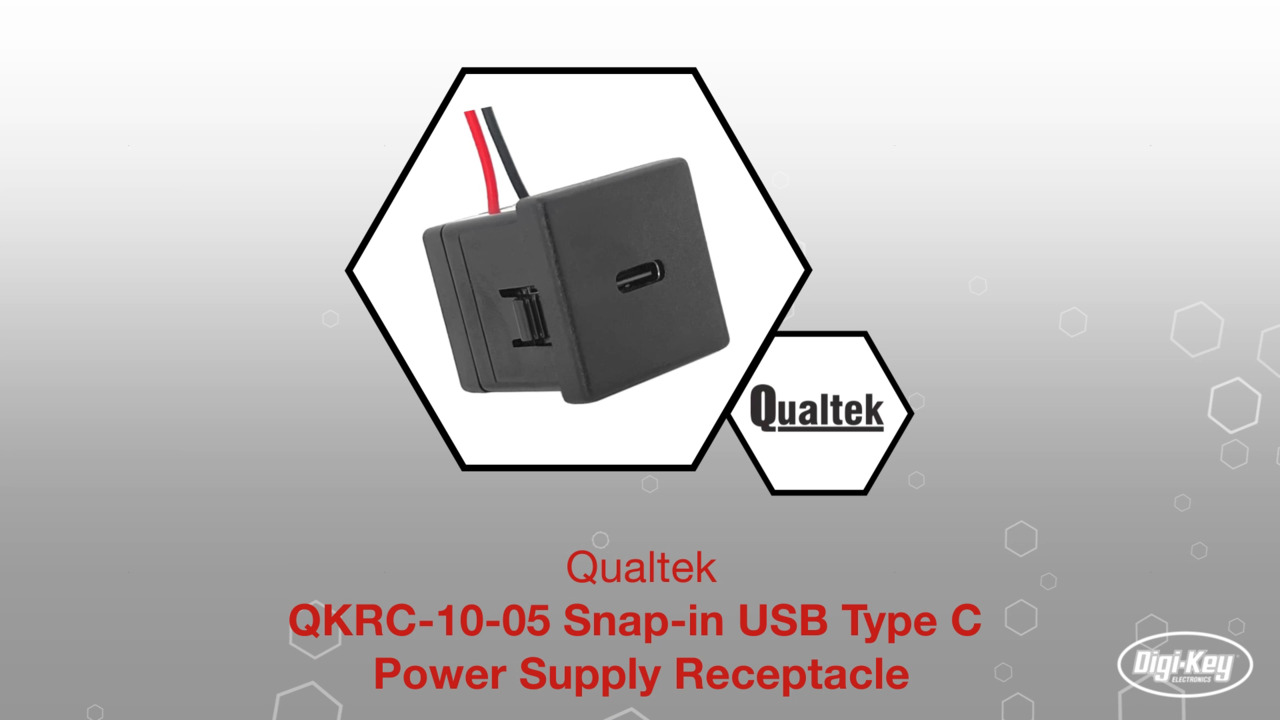
For these installations, the Qualtek Electronics Corp. QKRC-10-05 (Figure 3), a fully enclosed, snap-in USB-C power receptacle, is well suited.
 Figure 3: The QKRC-10-05 is an enclosed, self-contained AC-to-USB-C receptacle power module. (Image source: Qualtek)
This USB-C converter doesn’t break new technical ground with a clever circuit or a new process technology. Instead, it takes a modest problem and solves it through simple packaging, attention to electrical and mechanical details, and comprehensive specifications. It’s what designers call a “problem solver” with no downsides.
This self-contained receptacle system includes a power unit that converts 90 to 132 volts AC (VAC) to 5 volts DC (VDC) at 2 A, delivering 10 watts and terminating in a USB-C receptacle. Installation is easy: simply snap the receptacle into the panel or system cutout, then wire the supplied 24 inch (in.) leads to the 120 VAC input.
Its compact design lets any system with Qualtek's existing convenience outlets add a powered USB-C port without changing users’ current panel cutouts, system design, or space constraints. The snap-in design protrusions integrated into the 27.0 × 27.0 × 25.0 mm receptacle body (meeting UL 94 V-0 for Safety of Flammability of Plastic) support panel thicknesses from 0.8 to 1.8 mm.
Among its fully specified features is a reliability level of 50,000 hours mean time between failures (MTBF) at 25°C (at rated input voltage, using the Bellcore SR-332 method). Its operating temperature range is 0 to 40°C with relative humidity from 10% to 90% (non-condensing).
The supply tolerates line surges and spikes, and there is an internal line-side fuse; regulation, ripple, and noise levels are fully specified as well. The unit is protected against load-side short circuits and overcurrent conditions. For regulatory compliance, it meets UL 62368-1 and CSA C22.2 No.62368-1 (Canada) requirements.
Conclusion
The QKRC-10-05 module from Qualtek provides a fast, efficient, space-saving, rugged, all-in-one solution for providing a reliable USB-C receptacle on a panel. It eliminates the need for an additional power supply, screws, and wiring, simplifying design, addressing performance-related regulatory issues, and minimizing installation time.
About this author

Bill Schweber is an electronics engineer who has written three textbooks on electronic communications systems, as well as hundreds of technical articles, opinion columns, and product features. In past roles, he worked as a technical web-site manager for multiple topic-specific sites for EE Times, as well as both the Executive Editor and Analog Editor at EDN.
At Analog Devices, Inc. (a leading vendor of analog and mixed-signal ICs), Bill was in marketing communications (public relations); as a result, he has been on both sides of the technical PR function, presenting company products, stories, and messages to the media and also as the recipient of these.
Prior to the MarCom role at Analog, Bill was associate editor of their respected technical journal, and also worked in their product marketing and applications engineering groups. Before those roles, Bill was at Instron Corp., doing hands-on analog- and power-circuit design and systems integration for materials-testing machine controls.
He has an MSEE (Univ. of Mass) and BSEE (Columbia Univ.), is a Registered Professional Engineer, and holds an Advanced Class amateur radio license. Bill has also planned, written, and presented on-line courses on a variety of engineering topics, including MOSFET basics, ADC selection, and driving LEDs.

Have questions or comments? Continue the conversation on TechForum, DigiKey's online community and technical resource.
Visit TechForumMore Blogs from this Author