Configuración
 Entrega rápida
 Tipos de pago


 Producto del mercado

Número de parte del fabricante K014-E
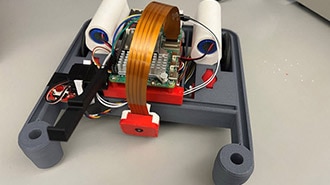
BALA2 FIRE SELF-BALANCING ROBOT
M5Stack Technology Co., Ltd.

So far, our balance bot has learned to stand upright and hold its position, and it does so robustly, thanks to domain randomization. But a robot that just stands there isn't very interesting. In this episode, we extend the agent to accept movement commands, so we can drive the robot forward, backward, and in either direction while it continues to balance on its own.
This requires reworking both the observation vector and the reward function, and it means another round of curriculum learning: this time across ten training phases that interleave command learning with domain randomization. Deployment to the real robot, including a Wi-Fi access point and web-based controller, is in the next (and final) episode.
All project files are available at github.com/ShawnHymel/reinforcement-learning-for-robotics.
Previously, our observation vector had four elements: pitch, pitch rate, and the left and right wheel velocities. The agent used those to decide how to drive the motors and stay upright.
To support commands, we add two more values to the observation:
The agent now sees these commands alongside its sensor readings and learns to produce motor outputs that satisfy both: stay balanced and track the commanded velocity and rotation. From the agent's perspective, "stay still" is just a special case of the command (velocity zero, yaw zero), which means the previous balancing behavior generalizes naturally.

Two new parameters are added to DomainRandomConfig to control how commands are sampled during training:
That last one is important. If you sample uniformly from [-1, 1] throughout training, the probability of commanding the robot to stand perfectly still is nearly zero. Setting a zero probability of around 30–50% ensures the agent spends a meaningful portion of training learning to hold position, which keeps the balancing skill sharp as it learns to move.
The reward function from previous episodes rewarded staying upright and penalized drifting from the origin. That origin penalty is gone now — it doesn't make sense when we want the robot to move. Instead, the new reward function has five components:
reward = coeff * exp(-((actual - target)² / sigma²))
This gives a reward of 1 when tracking is perfect and decays toward 0 as the error grows. The sigma parameter controls tolerance: larger values allow more slop, smaller values require tighter tracking. Separate sigma values are used for velocity and yaw.
Privileged information is used here: the robot's actual forward velocity in the world frame and yaw rate come directly from MuJoCo rather than from sensors, since those aren't available on the real robot. This is fine for training, as the agent learns to produce the right motor commands to achieve the target, and the learned policy transfers to the real robot even without direct access to those values.
Adding commands to domain randomization significantly increases the complexity of the training task. After some experimentation, it turned out that trying to teach commands on top of a fully domain-randomized agent (as trained in episode 4) was too difficult. The agent struggled to learn the new behavior. The solution was to restart curriculum learning from scratch, interleaving command learning and domain randomization rather than treating them sequentially.
The ten training phases are:
The key lesson here is sequencing: make sure the agent is performing well in each phase before moving on. If the robot isn't following velocity commands reliably by the end of Phase 4, don't add domain randomization in Phase 6 hoping it works itself out.
Open workspace/software/ep05/train_with_ppo_command.ipynb in JupyterLab and run through the cells. The PPO configuration is mostly the same as Episode 4, with one change: the actor and critic networks are slightly larger at 48 nodes per hidden layer (up from 32). This gives the networks a bit more capacity to handle the additional complexity of tracking commands on top of balancing. It still runs comfortably within the 5ms deadline on the ESP32.
Note that training ten phases takes several hours. Once complete, navigate to localhost:6006 to review training in TensorBoard. Episodic returns will likely jump around more than in previous episodes given the complexity of the reward function, but what matters is that the best model from each phase is solid.
Run the evaluation cell when training is complete. You should see the robot receive a series of commands (hold still, move forward, turn) and respond to each smoothly without falling over. Pay attention to the transitions between commands: the smoothness penalty should be visible in how the robot eases into new directions rather than jerking abruptly.

Once you're happy with the evaluation results, run the last few cells to close out of MuJoCo and export the actor.
Note that the observation vector is now six elements instead of four (pitch, pitch rate, left wheel velocity, right wheel velocity, velocity command, and yaw command). The firmware will need to be updated accordingly, which is what we'll cover in the final episode along with the Wi-Fi controller.
We have a trained agent that can balance and follow movement commands. In the final episode, we'll deploy this to the real robot and build a web-based remote controller: a Wi-Fi access point running on one core of the ESP32 serving a page that sends commands over a WebSocket connection to the inference loop running on the other core.