Settings
 Fast Delivery
 Payment Types


 Marketplace Product

Mfr Part # 4663
6V AIR VALVE WITH 2-PIN JST PH C
Adafruit Industries LLC

License: GNU Lesser General Public License
This is my hydraulic dot matrix printer, which sounds way too technical and complicated. Essentially, it's a sidewalk water printer. It is a gadget I designed that sprays synchronized bursts of water from the back of my Onewheel. The goal is to print messages of kindness with water as I ride through public spaces. Think of it as wholesome, nondestructive graffiti.
Of course, things never go according to plan. In part 1, I struggled to bring this thing to life. At the beginning, this project felt like an absolute failure, but eventually, I got a janky prototype that printed words, as long as you didn't look too closely. That first test gave me enough confidence to move forward.
My early 3D-printed manifold was a disaster, leaking everywhere and leaving me wondering how water could seep through a part with 100% infill. After sharing my manifold struggles on social media, I received a lot of advice. The best option was to find an off-the-shelf aluminum manifold. I found an industrial supplier, and once it arrived, I was ready to clean up the rat's nest of splitters.
I keep reminding myself that this is just a prototype. It doesn't have to look pretty yet; it just has to work. But how do you actually get water to spell words while moving at random speeds? Rather than diving into all of the boring code, I’ll give you a quick glimpse into the logic with some graph paper and a paper cutout of the Onewheel. The Onewheel has an array of eight solenoids. If I open and close them at the right time, I can form the first column, the second column, and so on for each letter. I found an ASCII table font file that represents every symbol using five bytes. For example, the first letter of my name, Zach, can be represented by bytes like:
Z {0x61, 0x51, 0x49, 0x45, and 0x43}
a {0x20, 0x54, 0x54, 0x54, and 0x78}
c {0x38, 0x44, 0x44, 0x44, and 0x20}
h {0x7F, 0x08, 0x04, 0x04, and 0x78}
A byte is just a group of eight ones and zeros. As the Onewheel moves, the microcontroller converts those numbers to binary and sprays them out one column at a time. Anytime a pixel is "on," the solenoid opens; if it's "off," it stays closed. Just using the data in the ASCII font file, we can spell out any word, including numbers and punctuation. Of course, the microcontroller is much faster than I can do it on paper.
I’ve been working hard on tweaking the system. I replaced the control board and a solenoid valve. After more unsuccessful tests, I realized the prototype's biggest issue was the spray angle. I had originally attached the valves at an angle so they wouldn't drag on the ground, but that distorted the messages. Moving forward, I had to figure out how to aim them straight down. This meant redesigning the valve bracket from the ground up and ditching the bulky aluminum extrusion. Fitting everything underneath the Onewheel deck is the hardest part of the project. Because of the 6mm tubing's bend radius, I ended up rotating the outermost valves inward toward the manifold to make the tubing fit. It creates an optical illusion of an arc, but it is actually a straight row of nozzles. I also designed and printed a new bracket to hold the valves at the right angle. I still need to add positional feedback to the new version. I ditched the reflective sensor for an optical encoder. It’s much more reliable and provides a quadrature output, allowing me to track speed and direction.
For the body of the machine, I 3D printed a new deck and fender. My printer wasn't big enough to do it in one piece, so I had to split the model in half. To make it rigid, I used my soldering iron to plastic weld the pieces together, using extra filament as a filler rod. It’s remarkably strong, and the seam is almost invisible.
In reality, most of the testing in engineering videos never makes it into the final edit. I spent hours on my driveway riding back and forth, tweaking code, and adjusting valves, trying to get everything to line up. Honestly, the bulk of these projects happens behind a screen, debugging and iterating until it all finally works. When I finally got a dry, sunny day to test the new version, I was nervous. The biggest challenge is balancing the spacing between columns with the duration the valves remain open. I wrote a web app for my phone so I could adjust parameters such as valve timing and encoder pulses on the fly with little sliders.
During the test, I managed to print the word "KINDNESS." Since there are only eight valves, the resolution isn't amazing, but it works. If I want higher resolution, I need to have 24 valves. I noticed that if I ride too fast, the message gets spread out. It’s exactly like camera settings: if your shutter speed is longer than your frame rate, everything blurs. If the valve open time is longer than the interval between columns, the letters smear.
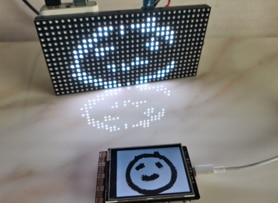
I’ve made a huge amount of progress since that first janky prototype. All the 3D modeling paid off, and everything fits perfectly now. I even added a tiny TFT display on the microcontroller that shows a 5x7 grid of which droplets are being sprayed in real time. On my next test, I found that slowing down and setting the valve duration from 50 to 60 milliseconds made the message much clearer.
I’m already thinking about the next version. I want to add 16 more solenoids to bring the total to 24 for better resolution and spread them out a bit more. That would allow for more complex fonts, emojis, and maybe even Pac-Man symbols. At its core, this is a fun engineering challenge, but it's also about human connection. I want to see how strangers react and what positive messages they choose to share. I’m not giving up until this thing is flawless.